Used to create and manage the information of many companies with recruitment needs. The data at this screen will be used with other screens in the Recruitment module.
Create New Company
To create a company:
- Step 1. Go to the Recruitment module in the left sidebar and select Settings menu
- Step 2. Select Company list menu -> Click New company button.
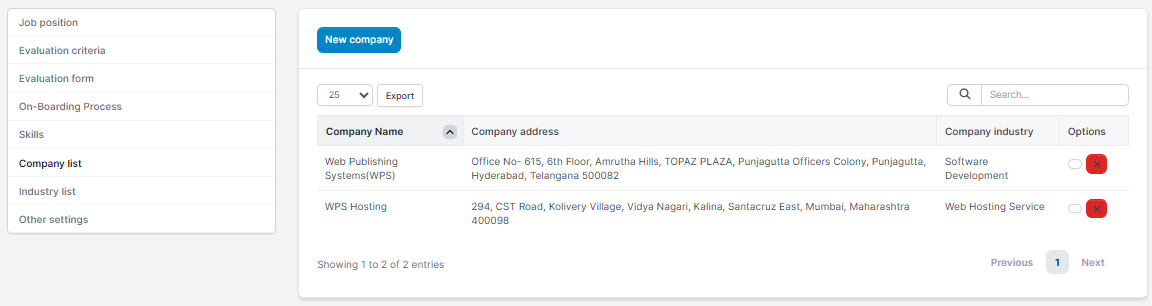
- Step 3. In the New company page, fill in the required details
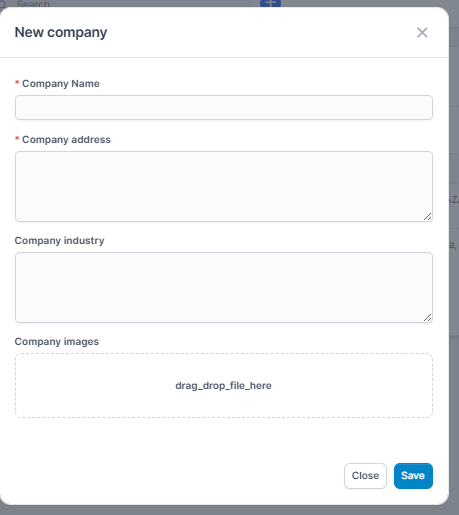
1. Enter the Company Name
2. Enter the Company address
3. Enter the Company industry,
4. Choose company images: When the company's recruitment needs are displayed on the recruitment portal (Recruitment Portal menu), the uploaded photos will be displayed. - Step 4. Click Save button
Edit Company
To edit the details of a company:
- Step 1. Go to the Recruitment module in the left sidebar and select Settings menu
- Step 2. Select the Company list menu -> Select the company need to be edited and click Edit button
- Step 3. Make the necessary changes and click Save button
Delete Company
- Step 1. Select the Company list menu -> Select the company need to be deleted and click Delete button
- Step 2. Confirm your selection in the following pop-up. The company will be deleted.