Converting proposal to estimate/invoice

To convert proposal to invoice or estimate select the proposal from the table and on the right side a convert button will be shown
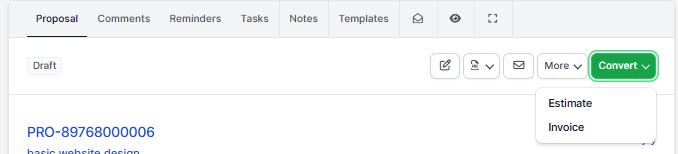
Click on the button and choose Estimate or Invoice. After you choose a popup will be shown with the preview info also with the parsed items which are auto inserted to the estimate/invoice.

When you are satisfied from the result click Save.

After converting the proposal will be auto marked as accepted (if is not already marked as Accepted).

If the proposal is related with some lead which is not converted to client you will need to convert first the lead to client and then get back here and convert the proposal to estimate or invoice.

Did you find this article useful?

  • Merging Invoices

    Merging invoices is feature in WPSCRM that allows you to merge/include already created invoices into...
  • Invoice Overdue Notices

    You can send invoice overdue notice manually or automatically with cron job. Sending with cron job ...
  • Record Invoice Payment

    While viewing the invoice from the admin area click on the + Payment button to record a ne...
  • Send Invoice to Email

    WPSCRM have the option to send this invoice to a customer which is related.  Also, the PDF invo...
  • Recurring Invoice

    Settings Navigate to Settings Menu -> Settings -> Cron Job Create a new invoice from the main ...