Finance Overview is showcase of all logged project timesheets together including project expenses.
- Logged Hours – Shows total logged project hours Billable and Not Billable
- Billable Hours – Shows total billable hours – All time
- Billed Hours – Shows total invoiced hours.
- Unbillable Hours – Shows total unbilled hours. Ex. Means that the project have 3 unbilled hours from the last project invoice (If any).

Project have logged total 3 hours and suppose Rate per hours in project settings is set 40 INR the calculation will go like this:
40INR x 3 = Total 120INR
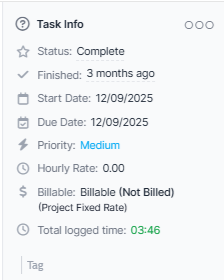
Example billing type Task Hours
The total per hour in this case is taken from the task Total Per Hour
Example:
Fix firefox bug – Total per hour is 25INR
Create new table in database – Total Per hour is 40INR
Task 1 (Fix firefox bug) have logged 1 hour and Task 2 (Create new table in database) have logged 2 hours.
The calculation goes like this:
25INR x 1 hours (Task 1 – Fix firefox bug)
40INR x 2 hours (Task 2 – Create new table in database)
Equal to 105INR