PDF Payslip Templates screen to use to design PDF Payslip Templates to use for Payslip's PDF
* Note: After having the Payslip Template, we proceed to create the PDF template. Because the PDF template will belong to the corresponding Payslip Template
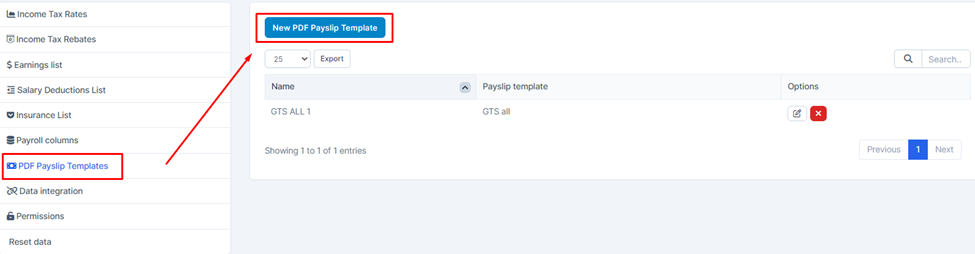
- Step 1: Select Settings -> Select PDF Payslip Template screen -> Select New PDF Payslip Template function
- Step 2: The system will display the Add New PDF Payslip Template screen used to design PDF templates for Payslip's PDF
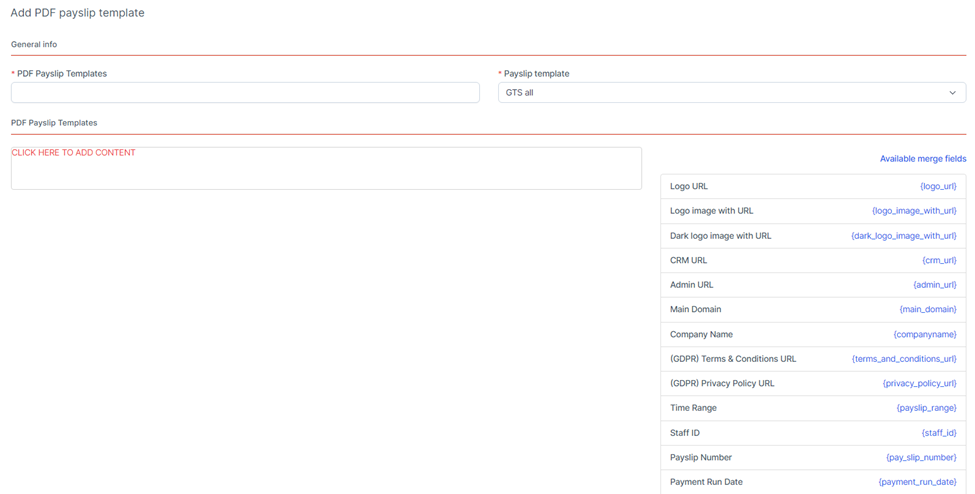
Explanation:
The Payslip Template field is taken from the Payslip Template menu screen
Available merge fields area is used to select column values displayed on PDF -> Select values and designs in the CONTENT area
If you don't create a PDF template for Payslip's PDF, the PDF will display the same fixed template as ever
-
Step 3: Select the Payslips menu screen -> Select Add or you can edit the information of old Payslips -> Select Payslip Template -> Select PDF Payslip Template so that when creating Payslip and viewing it on PDF, the PDF will be displayed like the template created
* The PDF of the Payslip screen (Admin and staff) will both display the same as the selected template