Receiving-Exporting return order Setting

Go to Settings menu under Inventory module from the left sidebar -> Select General Settings menu -> Receiving-Exporting return order -> enter content -> click Save button
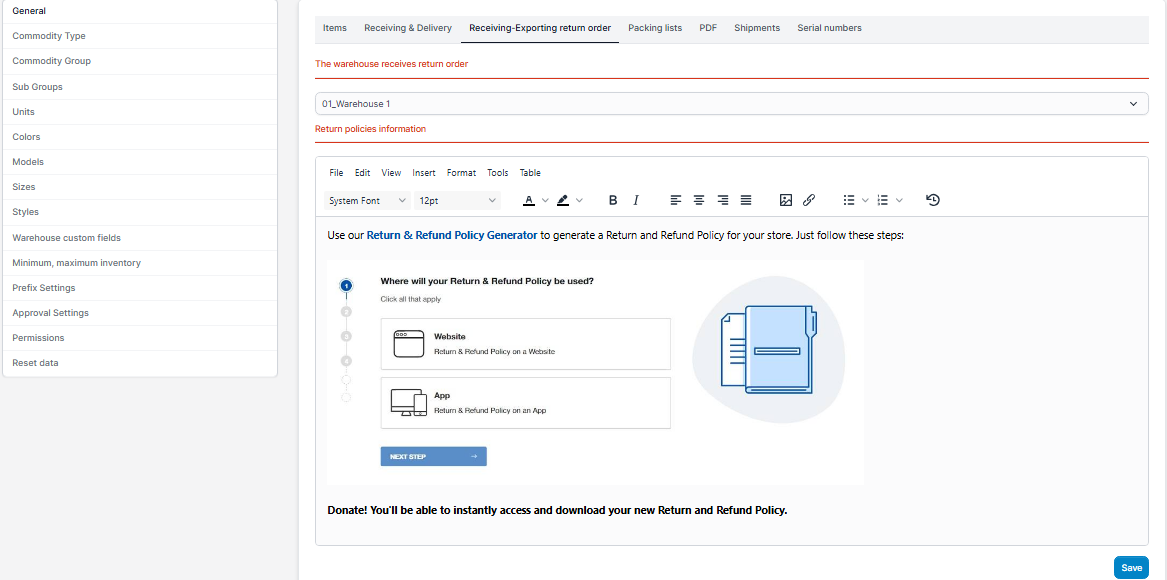
  • The warehouse receives return order: Select the default warehouse to import from the return order (the return order comes from Omni sale).
  • Return policies & Information:  enter the content of the return policy (used to display in the Add Delivery return purchasing goods and Add receipt return order pages).

Did you find this article useful?

  • Warehouse

    You can add warehouse where you keep the goods. You can choose a warehouse to export (sell) or recei...
  • Create, Update and Delete Item

    This items to use for: sale, purchase, inventory, manufacturing. Create Item To create an item: ...
  • Item Settings

    Item SettingsGo to Settings menu under Inventory module from the left sidebar -> Select...
  • Receiving & Delivery Settings

    Go to Settings menu under Inventory module from the left sidebar -> Select General Sett...
  • PDF Setting

    Go to Settings menu under Inventory module from the left sidebar -> Select General Settings ->...