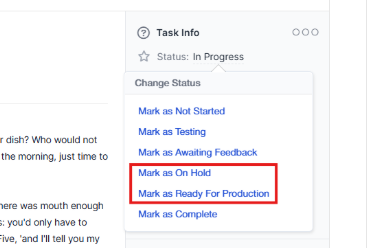
By default, WPSCRM ships with 5 predefined statuses: Not Started, In Progress, Testing, Awaiting Feedback, and Complete, but you can inject new statuses with a simple action hook to fit your needs.
The statuses Not Started, Complete and In Progress are core statuses and you should not modify these statuses in order everything to work properly.
We assume that you have some basic knowledge of reading php code for this article, but it won’t be that hard if you don’t have it. You can just copy and paste the code and adjust the keys for your needs (see below key explanation).
In this example, you will add 2 new task statuses with names On Hold and Ready For Production
In application/helpers a create file my_functions_helper.php and add the following code:
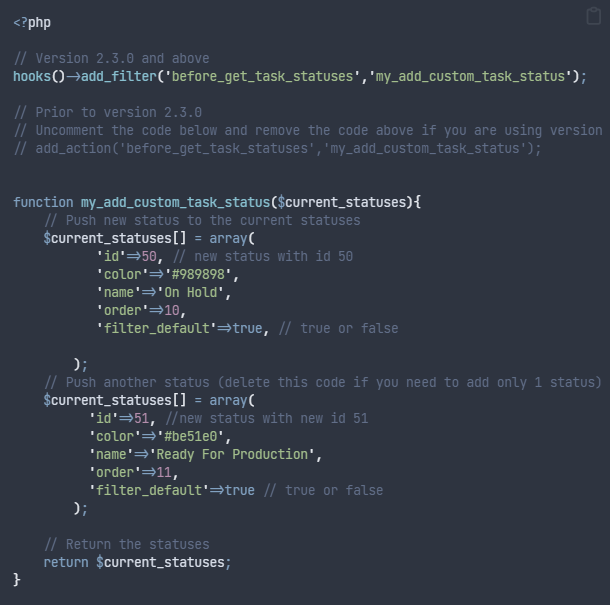
- id – The ID of the task status. Use a higher ID value to avoid conflicts with the system’s default status IDs. For example, defaults currently use IDs 1–5; if a future default is assigned ID 6 and you have already assigned ID 6 to a custom status, this can cause problems. Do not change an ID after tasks are already using that status.
- color – The color representing this status, specified in hexadecimal format (e.g., #FF0000).
- name – The label displayed to users for this status.
- order – The display order of the status (for example, its position in Kanban columns).
- filter_default – Controls whether tasks with this status are included in lists by default. If false, tasks using this status are excluded from task lists (main or related) and must be included manually via filters. For example, you may not want tasks marked ‘Cancelled’ to appear in lists by default.
After you adjust the code to fit your needs, save the file my_functions_helper.php, and you will be able to see your new task statuses.