In order to create a new task, from the main menu navigate to Tasks and click on the New Task button.
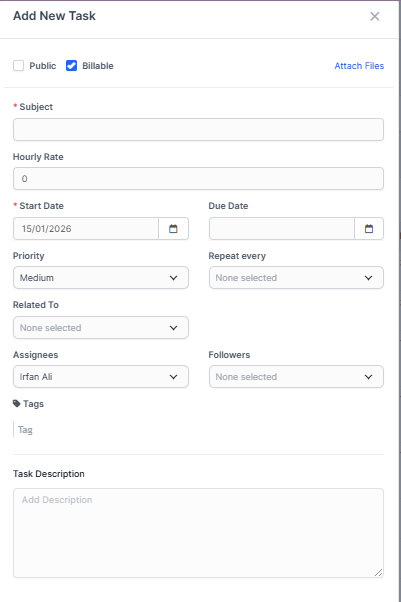
- Subject – Enter a clear, concise subject for the task to identify it easily.
- Hourly Rate – Specify the task’s hourly rate.
- Start Date – Set the date when the task should begin.
- Due Date – Set the date by which the task should be completed.
- Priority – Choose a priority level: Low, Medium, High, or Urgent.
- Repeat Every – If the task recurs, enable recurrence and select the repeat interval and options that suit your needs.
- Related To – Relate the task to an entity such as a project, customer, or invoice by selecting from the list.
- Tags – Add tags to categorize and quickly identify the task (for example: bug, WordPress).
- Task Description – Provide a detailed description and any additional information for the task.
- Click Save to save the task.
After you create the task, you will be able to add assignes and followers directly in the task modal from the right side.
When a follower or assignee is added to the task, the user will receive an email and bell notifications that he/she is added as assignee or follower to the task, if you need to adjust the email templates that are sent to the user, you can do this in Setup->Email Templates.
Task Comments
The users that are able to view the tasks, like creator, assignees, and followers, can comment on the task for further collaboration.
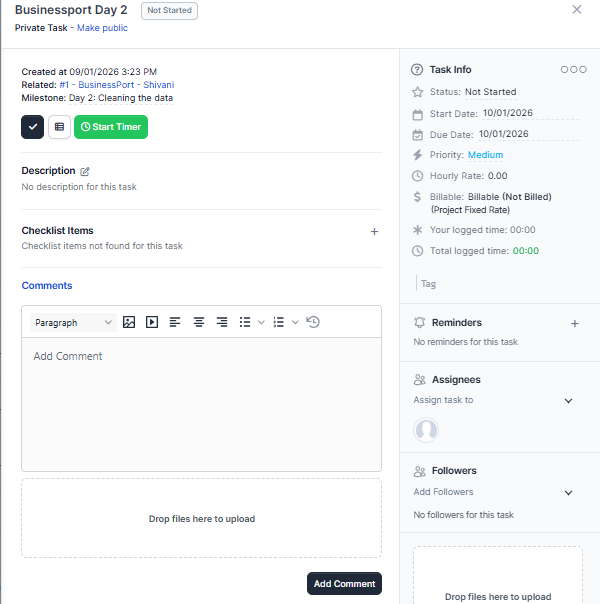
To add task comments, inside the task modal, click on the Comments link and click on the empty text area to add comment content.
If you need to attach files with the comment, you can just drag and drop the files inside the marked upload files area.