Overview
Learn the steps to update your whatsbot it will easily update your module without going to Envato (CodeCanyon). You can check for updates, download new versions, and update your database all from inside your CRM. This keeps your system up-to-date with the newest features and fixes.
1. Checking for Updates
The update checker allows you to verify if a newer version of WhatsBot is available compared to what's currently installed on your system.

How to do it:
- Go to your modules page
- Find WhatsBot in your list
- Click the "Check Update" button (the red box in the third image)
- The system will check if your version (2.1.0) is the latest
- If a newer version (2.1.1) exists, you'll see the update screen
2. Installing the Update
This process downloads and installs the new files required for the latest WhatsBot version.

How to do it:
Before proceeding, create a complete backup of your current installation (files and database) as recommended in the yellow warning box
- When an update is available, you'll see the "Module Update" screen showing a comparison between your current version (2.1.0) and the latest version (2.1.1)
- Enter your Envato Username and Purchase Key.
- Click the "Download files" button to begin retrieving the latest version
- The system will automatically download and install the new files
3. Completing the Database Update
How to do it:
- After the file installation completes, the system will check if your database needs updating
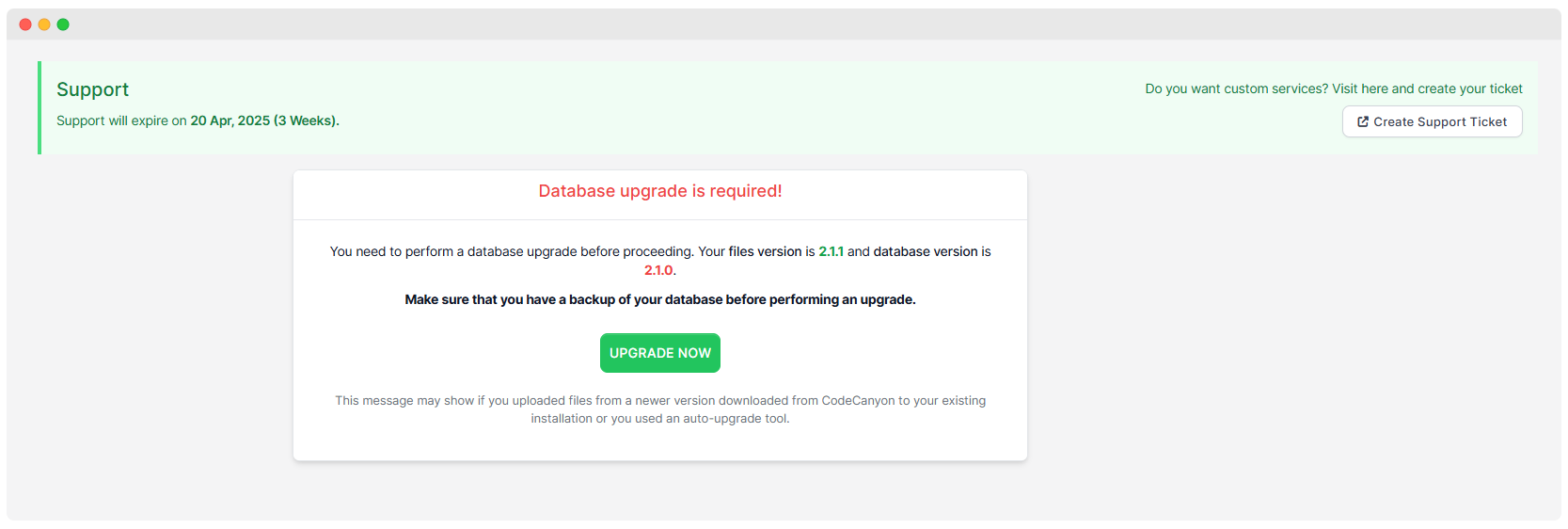
- If required, you'll see the "Database upgrade is required!" message showing that your files version is 2.1.1 but your database is still at version 2.1.0
- Make absolutely sure you have a backup of your database before continuing
- Click the "UPGRADE NOW" button to synchronize your database with the new file structure
- The system will run necessary database migrations and updates
- Once complete, both your files and database will be at latest version
- You can verify the update was successful by checking that the version number has changed throughout the system